
Recruiters spend too much time on tasks that should already be automated.
Scheduling interviews, chasing scorecards, reviewing hundreds of applications, copying data between tools, and manually following up with candidates. It's the work that makes recruiting feel like operations instead of talent acquisition.
Recruitment process automation is changing that. Traditional tools automate individual tasks. Today's AI recruiting agents can handle entire workflows, from sourcing and screening candidates to personalized outreach and interview scheduling, with recruiters staying in control.
Here are 12 practical ways to automate your recruiting process, reduce manual work, and build a faster, more effective hiring process.
All 12 ways to automate recruiting at a glance.
| # | Automation | Where it helps | Leverage |
|---|---|---|---|
| 1 | AI sourcing from the brief | Build qualified shortlists faster | High |
| 2 | Automated application review | Prioritize strong inbound applicants | High |
| 3 | AI-powered candidate screening | Evaluate more candidates without more recruiter calls | Medium-high |
| 4 | Automated candidate outreach | Personalize outreach, manage replies, and book meetings | Medium-high |
| 5 | Self-serve scheduling | Reduce calendar coordination | Medium |
| 6 | AI notetaking | Capture interviews without manual notes | Highest |
| 7 | Structured scorecards + ATS write-back | Speed up feedback and hiring decisions | Highest |
| 8 | Automated feedback reminders | Reduce time spent chasing interviewers | Medium |
| 9 | Candidate status comms | Keep candidates informed automatically | Medium |
| 10 | Offer & onboarding handoff | Streamline the transition from hiring to onboarding | Medium |
| 11 | Pipeline reporting automation | Identify bottlenecks without manual reporting | Medium-high |
| 12 | Interview intelligence flagging | Improve interview consistency and evaluation quality | High |
1. AI sourcing from the brief.
Manual sourcing is one of the biggest time taxes in recruiting. Building Boolean strings, trawling profiles, and researching candidates can eat up hours before you have a usable shortlist.
The 2026 default: give an AI Sourcing agent the JD, intake call, or examples of strong candidates. It researches candidates across relevant sources, including beyond LinkedIn, and returns a ranked shortlist with evidence of fit.
More advanced agents also learn from recruiter approvals and rejections, refining their understanding of what great looks like for each role. With tools like Metaview, sourcing can even start automatically when a new job opens in your ATS.
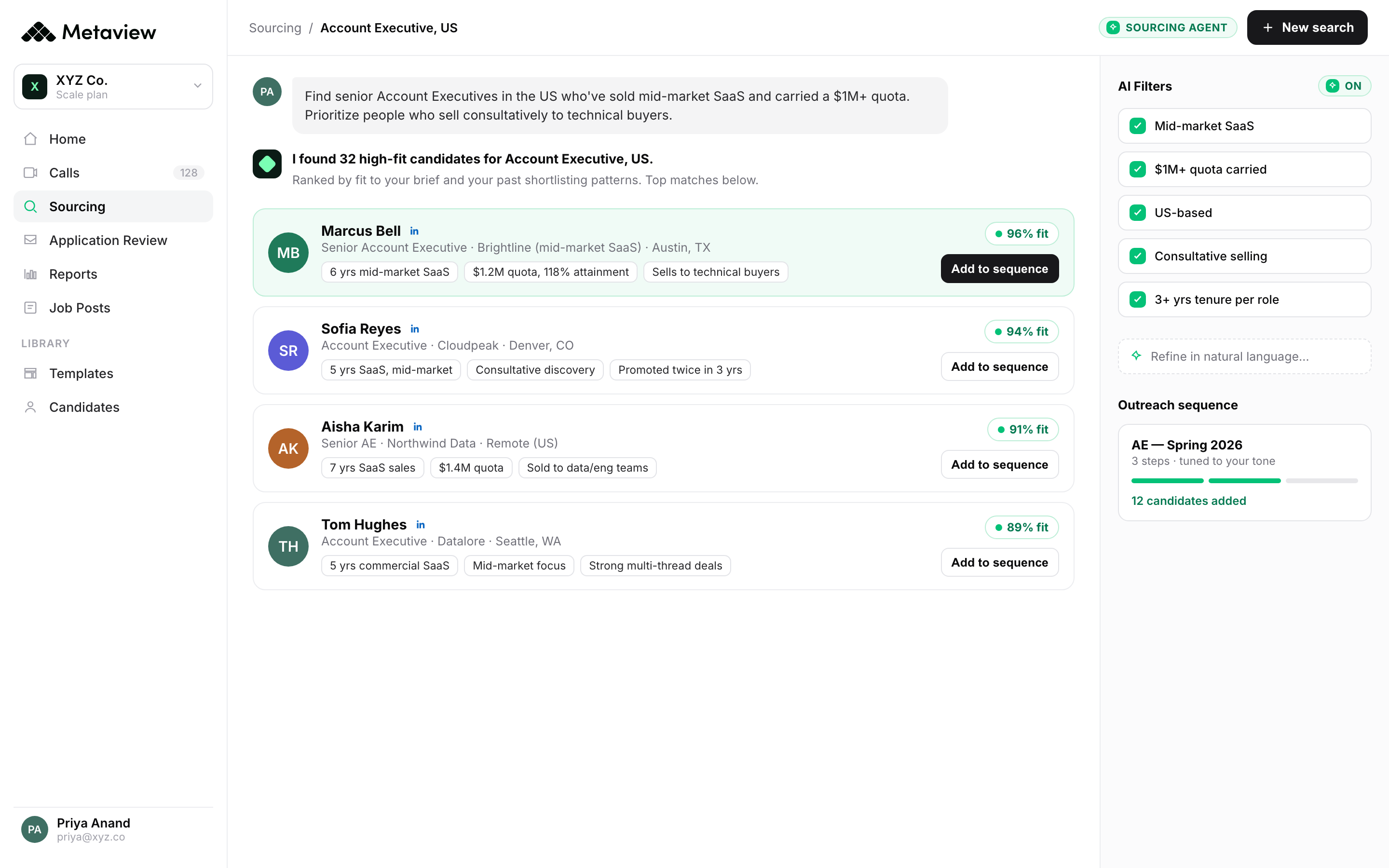
What to automate first: sourcing for one role family. Measure recruiter time-to-shortlist and the percentage of suggested candidates your team approves.
2. Automated application review.
200-300 applications per high-volume role at 30-45 seconds of manual review each equals two days of recruiter time per req.
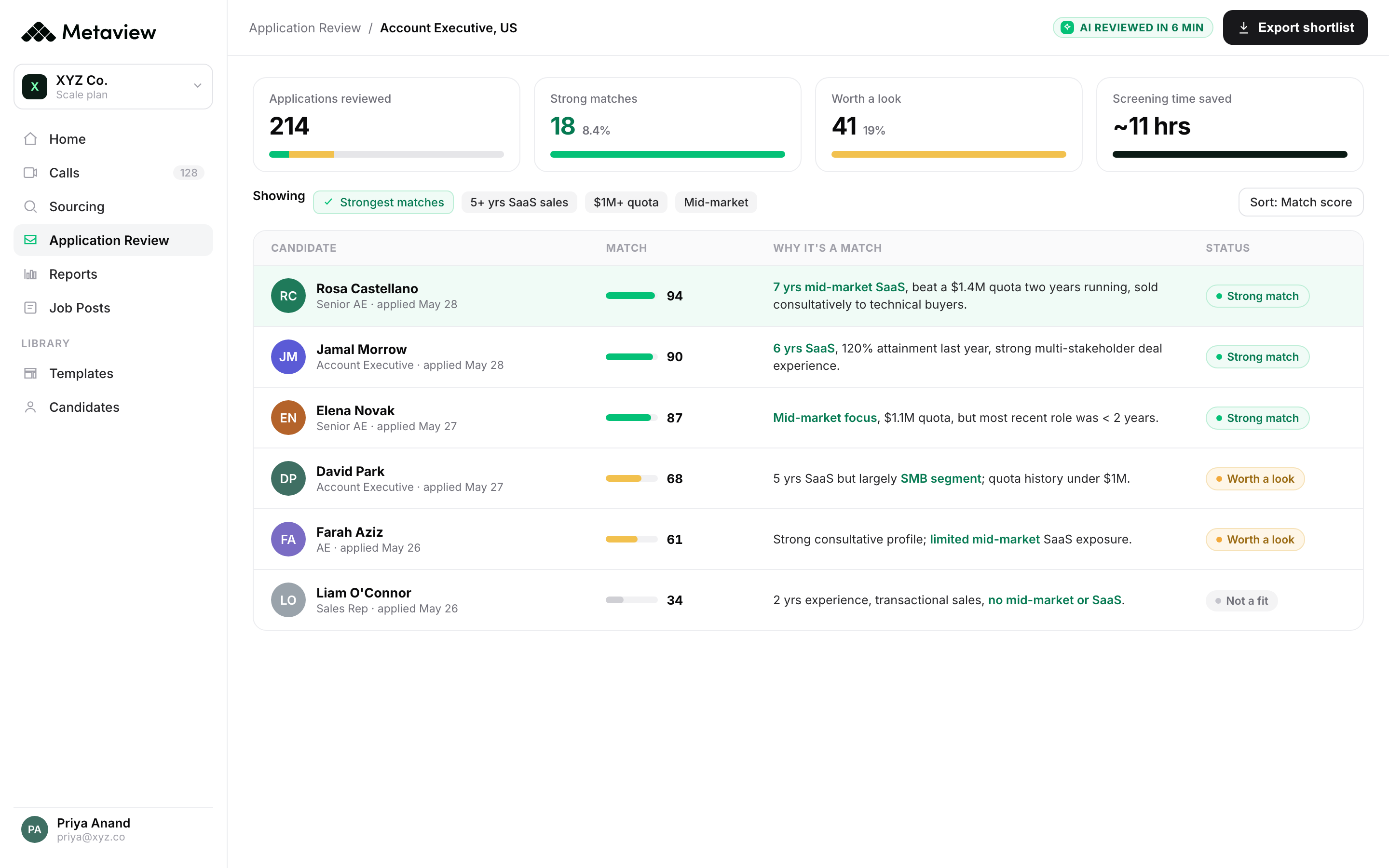
AI application review doesn't just keyword-match. The good versions explain why a candidate is a fit, which makes the recommendation usable instead of opaque.
What to automate first: the highest-volume role in your funnel. Track recruiter screening time and overall pipeline quality after four weeks.
This is the part Metaview automates: every inbound application ranked, with the reason it matches spelled out:
3. AI-powered candidate screening.
Recruiter screens are valuable, but running the same introductory calls for every applicant takes hours away from higher-impact work.
AI Screening agents can conduct two-way conversations with candidates, ask relevant follow-up questions, and evaluate their responses against your hiring criteria. Unlike rigid screening scripts, they adapt to what candidates actually say.
Metaview Screening can also assess practical skills through coding questions and role-play scenarios. Recruiters get a recording, summary, and structured evaluation for each candidate, without having to run every call themselves.
What to automate first: initial screening for one high-volume role. Measure time saved, screening turnaround, and the quality of candidates progressing to interview.
4. Automated candidate outreach.
Finding strong candidates is only useful if you can get them interested.
AI outreach has moved beyond drafting personalized messages. Recruiting agents can now research candidates, write tailored sequences, manage follow-ups, handle replies, and book interested candidates directly onto recruiters' calendars.
With fillmore by Metaview, the entire outbound process runs as one connected workflow. Brief the agent on the role, calibrate the shortlist, and let it handle outreach and scheduling while you stay in control of approvals.
What to automate first: outbound outreach for one hard-to-fill role. Compare response rates, qualified conversations booked, and recruiter time spent on manual follow-ups.
5. Self-serve scheduling.
Coordinator hours lost to calendar tetris are the unglamorous productivity drain that compounds across every active role.
Self-serve scheduling tools (Calendly, GoodTime, Prelude, Modernloop) let candidates pick slots, coordinate across multiple interviewers, and handle reschedules without a human in the loop.
What to automate first: single-stage screen scheduling. Measure coordinator hours before and after.
6. AI notetaking on every interview.
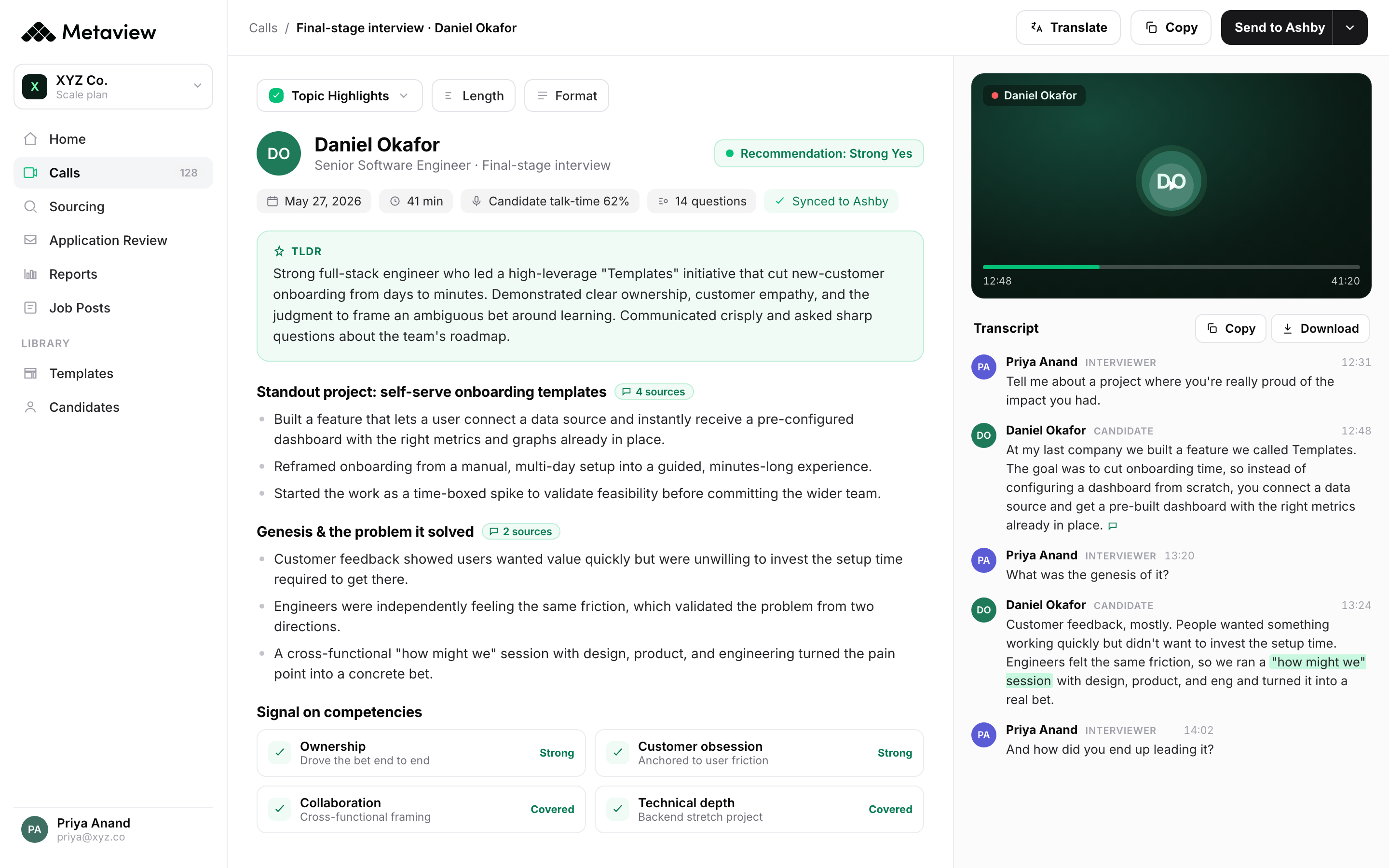
AI notetakers capture interview conversations and turn them into structured notes, so recruiters can focus on the candidate instead of typing throughout the call.
Metaview also offers botless recording through its desktop app, so you can capture conversations without adding a bot to the meeting. Sensitive information can be automatically redacted, and interview notes can be synced to your ATS to keep candidate records up to date.
What to automate first: interview notes for one recruiting team. Measure time saved on documentation and how quickly hiring managers receive interview feedback.
7. Structured scorecards and ATS write-back
Interview feedback is most useful when it's consistent, evidence-based, and available to the whole hiring team.
AI can turn interview conversations into structured scorecards aligned with your hiring criteria, helping interviewers capture relevant evidence without writing everything from scratch. Tools like Metaview can also sync notes and interview insights to your ATS, reducing manual data entry and keeping candidate records complete.
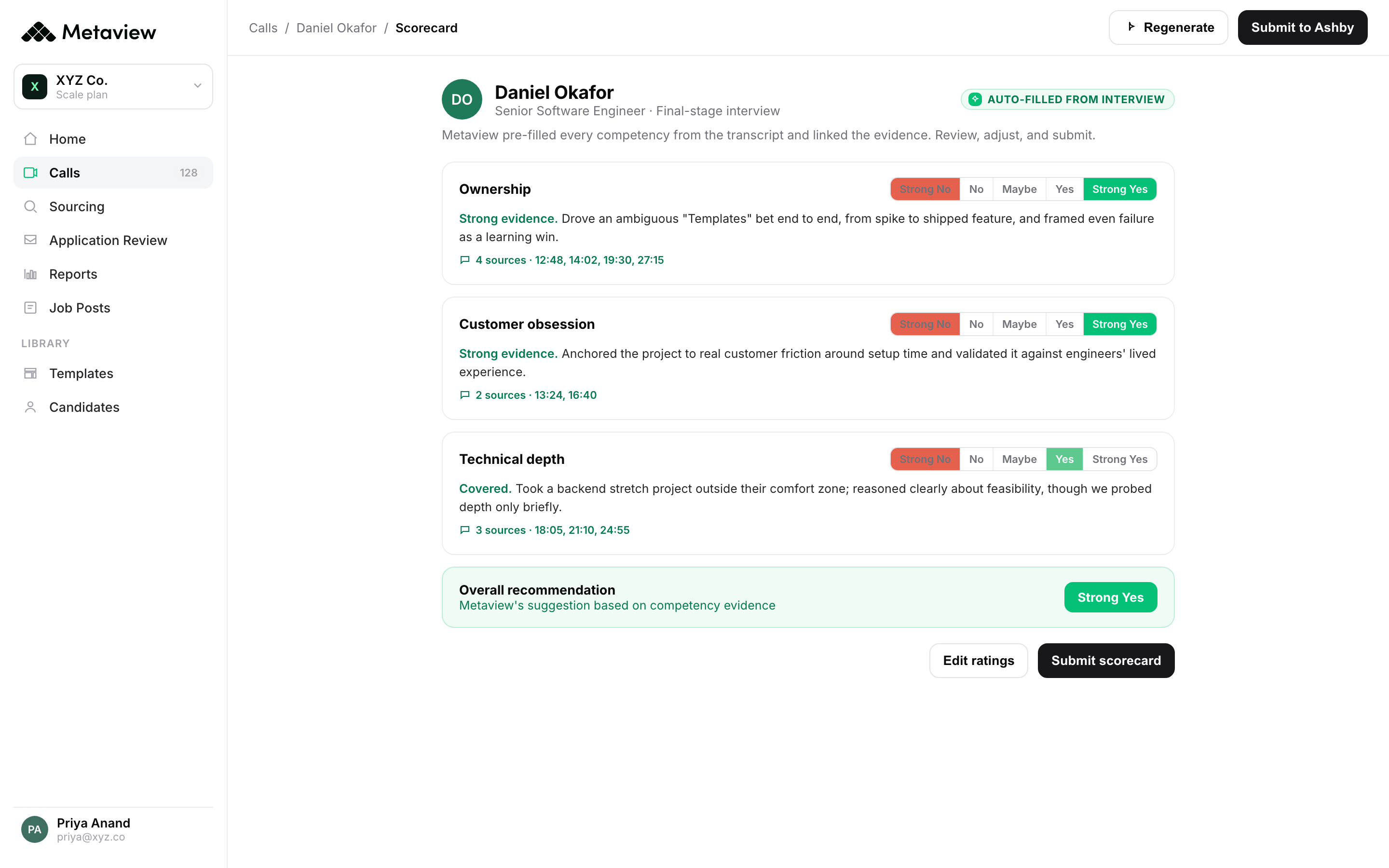
What to automate first: scorecard preparation and ATS updates for one interview stage. Track scorecard completion rates and time-to-feedback.
Recruiters really feel the difference if they forget to add Metaview to a call. They notice immediately that they have to take notes themselves.”
8. Automated feedback reminders.
Feedback chase is what fills 30% of recruiter inboxes.
The automation: ATS-triggered reminders sent to interviewers at 1, 4, and 24 hours after the interview ends. Escalate to the hiring manager at 48 hours. Stop the cycle when the scorecard lands.
What to automate first: the post-interview reminder sequence. Most ATSs ship this out of the box; teams just don't turn it on.
9. Candidate status communications.
Candidates ghost when they're left in silence. Most of the silence isn't intentional; it's the gap between "we should update them" and the recruiter remembering to do it.
Status comms automation triggers candidate emails at predictable stage transitions: thanks for applying, you're moving forward, here's what's next, here's the timeline. The recruiter approves the trigger logic once; the system runs.
What to automate first: the stage-transition email after a candidate clears the recruiter screen. Most teams have this off and don't realize it.
10. Offer and onboarding handoff.
The handoff from recruiting to people ops is the place most candidate experience breaks at the finish line.
Automation closes the loop: offer accepted in the ATS triggers the people ops checklist (background check, equipment order, day-one welcome) without a recruiter sending a hand-typed email.
What to automate first: the offer-accepted → onboarding-kickoff trigger. The candidate experiences the transition as continuous instead of dropped.
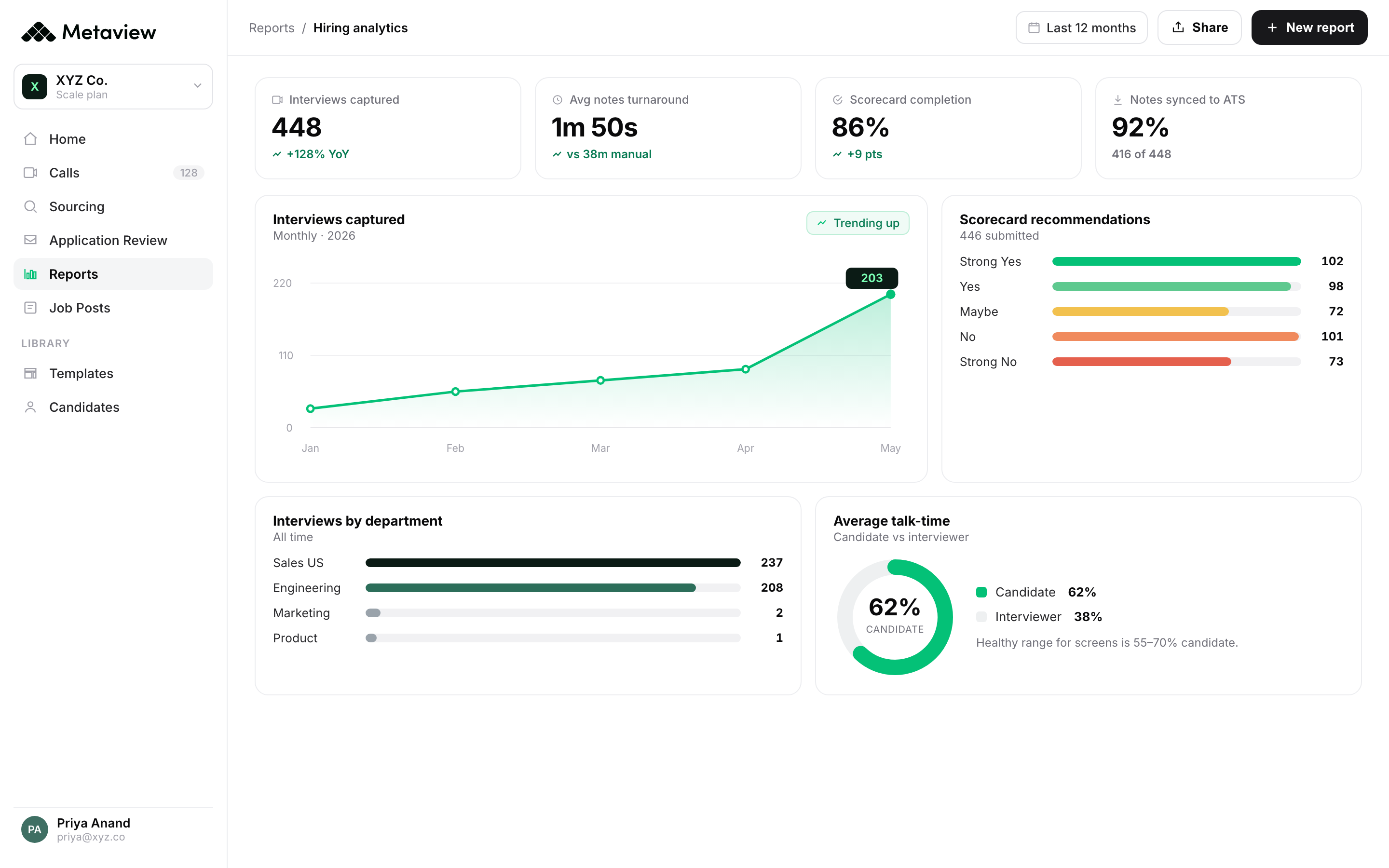
11. Pipeline reporting automation.
The pipeline report that takes a recruiting ops person three hours to assemble manually is the one that doesn't get built weekly. Which means the bottleneck doesn't get caught.
Automated dashboards in Ashby, Greenhouse, Lever, or a BI layer give the leadership team a live view. The recruiting team reviews monthly with the data already up to date.
What to automate first: the five metrics worth tracking (time to launch, time between stages, time-to-feedback, interview-to-offer ratio, offer acceptance) as a single dashboard.
Metaview keeps that dashboard live off the interview data it already captures:
12. Interview intelligence flagging.
Recruiters can't sit in every interview. But they still need to know whether candidates are being evaluated consistently.
Interview intelligence tools analyze hiring conversations to surface useful patterns, such as inconsistent questioning, missed competencies, or areas where interviewers could improve. Metaview helps teams understand what's happening across interviews and use that evidence to improve interviewer performance and hiring decisions.
What to automate first: interview quality reviews for one role or hiring team. Look for recurring gaps in evaluation and opportunities to improve interview consistency.
How to automate your recruiting process in 5 steps.
Recruitment process automation works best when you connect individual tasks into a smoother hiring workflow. You don't need to automate everything at once, but you do need a clear plan.
Here's where to start.
1. Map your current recruiting process.
Break down your hiring workflow from intake to offer. Identify where recruiters spend the most time on manual work, where candidates get stuck, and which tasks require constant follow-ups.
Look for repetitive work that follows predictable steps, such as application review, interview scheduling, note-taking, and candidate communications.
2. Prioritize the biggest opportunities.
Start with the automations that will make the biggest difference to your team. For some, that's AI notetaking and structured scorecards. For others, it's sourcing, screening, or managing thousands of inbound applications.
Focus on one or two high-impact workflows first. Measure the results before expanding.
3. Connect your tools to your ATS.
Your ATS should remain the central record of candidate activity. Choose automation tools that integrate with your existing system and keep candidate information up to date.
Otherwise, you risk creating more manual work as recruiters copy information between disconnected platforms.
4. Decide where recruiters stay in control.
Not every recruiting decision should be automated. Define which tasks AI agents can handle independently and where human approval is required.
For example, agents can research candidates, conduct initial screens, and prepare evaluations, while recruiters review the evidence and make hiring decisions. The right balance depends on your hiring process and risk requirements.
5. Measure results and expand.
Track the metrics that show whether automation is actually improving your hiring process: time to shortlist, screening turnaround, candidate response rates, time-to-feedback, and recruiter hours saved.
Once a workflow is performing well, expand it to other roles or teams. Over time, you can connect individual automations into a more efficient, end-to-end recruiting process.
Bring Metaview into your hiring stack.
Live notes, structured scorecards, and ATS sync, set up in under 10 minutes.
Frequently asked.
What is recruitment process automation?
Recruitment process automation uses software and AI to handle repetitive hiring tasks, including sourcing, application review, automated candidate screening, interview scheduling, and reporting. More advanced AI agents can manage connected workflows rather than automating individual tasks.
How do you automate the recruiting process?
Start by identifying repetitive tasks and bottlenecks in your existing hiring workflow. Prioritize high-impact opportunities, choose tools that integrate with your ATS, and define where human oversight is required. Measure the results before expanding automation to other recruiting stages.
Which stages of the hiring process can be automated?
Almost every stage can benefit from automation, including sourcing, application review, candidate screening, outreach, scheduling, interview notes, scorecards, and reporting. Recruiters should retain oversight of important hiring decisions, particularly candidate selection and rejection.
What's the difference between recruitment automation and AI recruiting agents?
Traditional recruitment automation follows predefined rules, such as sending an email when a candidate moves to a new ATS stage. AI recruiting agents can handle more complex, multi-step tasks, such as researching candidates, evaluating their fit, personalizing outreach, and scheduling interviews.
Can you automate recruiting without replacing your ATS?
Yes. Many recruiting automation platforms integrate directly with existing applicant tracking systems. Tools like Metaview add AI sourcing, application review, screening, and interview intelligence while keeping candidate records and hiring workflows connected to your ATS.
What are the risks of an automated hiring process?
Poorly implemented automation can introduce bias, create impersonal candidate experiences, or produce unreliable evaluations. Choose tools that provide clear evidence behind recommendations, protect candidate data, and let recruiters review important decisions. Regularly monitor outcomes to ensure automation improves hiring quality rather than simply increasing speed.


